How to work with Boo during our hiring process
At YottaBot we work with AI every day, and we want to hire people who do it well. You’re welcome to use Boo, or another AI assistant, while you apply and interview with us, wherever it helps you show your own perspective, skills and experience.
How to work with Boo at each stage
When you apply (your resume and application questions)
Write your first draft yourself, then use Boo to refine it. We want to hear about your real experience; Boo can help you present it well.
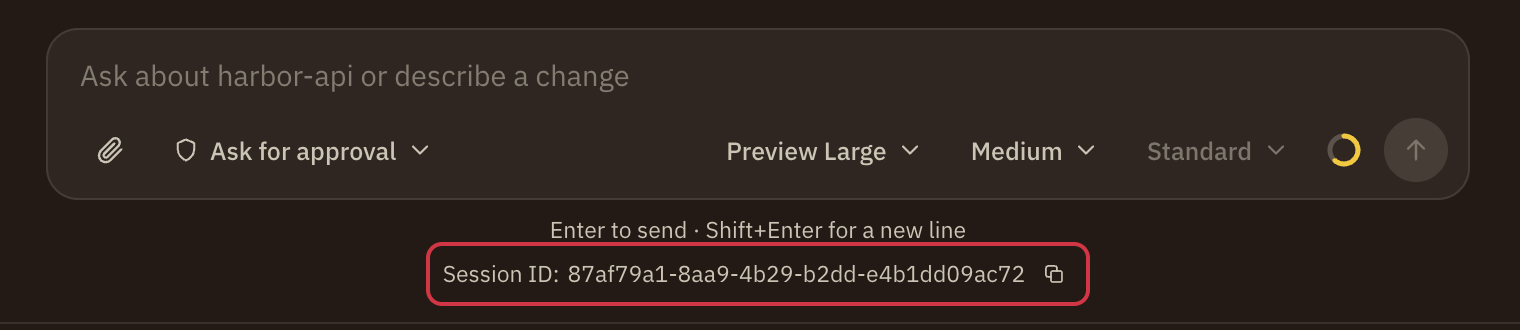
For “Why YottaBot?” and Additional Information, you can give us the ID of the Boo session you worked in and consent to our reviewing it. Showing how you think with Boo is a good way to stand out.
“Here’s my resume and the job description. Which of my experiences should my application answers lead with?”
During take-home assessments
Don’t use Boo unless the assessment says you may. We want to see what you can do on your own. When AI is allowed, the instructions will say so.
Preparing for interviews
Use Boo to learn about YottaBot, practice your answers, and prepare questions for your interviewers.
“Make me a study guide for an interview at YottaBot: what it builds, the problems of giving AI systems access controls and governance, and common technical and behavioral questions.”
During live interviews
Don’t use AI during a live interview unless we tell you it’s allowed. We want to see how you reason in real time. If you need an accommodation, tell your recruiter early.
Encouraged, and not allowed
| Use | Guidance | For example |
|---|---|---|
| Using Boo to describe your experience more clearly | Encouraged | “Here’s my draft about the migration I led. How can I show its impact in numbers?” |
| Using Boo to make up experience | Not allowed | Answers Boo writes from scratch that describe work you haven’t done. |
| Using Boo to prepare for interviews | Encouraged | “From YottaBot’s public site, what does it seem to value?” or practicing how you’ll explain a past project. |
| Using Boo during an assessment that doesn’t allow it | Not allowed | Having Boo write your code for a take-home that says no AI. |
Why these guidelines?
We see AI as a useful partner. We encourage you to use Boo to prepare and to refine your work, and we want to see your own thinking in assessments and interviews. Whatever the role, we ask you to:
- Use Boo thoughtfully. Let it help you strengthen your application and prepare, as a collaborator in telling your story.
- Be yourself. Use AI to improve your ideas, not to replace them. We want your experience and your reasoning.
- Be open about it. We’re open about how we use AI in hiring, and we ask the same of you.
How YottaBot uses AI in hiring
- We use AI, including Boo, in our own work. In hiring, that can include drafting job descriptions and interview questions and helping us write to candidates.
- We don’t use your application to train AI models.
- AI doesn’t make hiring decisions. People at YottaBot do.
If you’re designing a hiring process
You’re welcome to adapt these guidelines. Clear rules about AI help candidates and hiring teams alike.
Example prompts
Refining
- “Here’s how I described a team project. Help me say what it did for the business.”
- “Read my answer to this application question and tell me where it’s unclear or hard to follow.”
- “Help me explain this technical result in plain words for someone who isn’t an engineer.”
Preparing
- “Help me shape a two-minute answer to ‘Tell me about yourself’ for this role.”
- “Give me practice questions for a research scientist interview at a company building AI infrastructure.”
Researching
- “From YottaBot’s public site, what does the company value?”
- “What problems does YottaBot say it solves for people and companies running AI?”
- “What makes access control, security and governance for AI agents hard?”
Finding a session ID
In Boo Desktop, Web or Mobile, in Chat or Code, open the session. Its Session ID is under the message box; click the copy button beside it, then paste it into your application.